

Overview
| Feature Category | TripIt | Roadtrippers |
|---|---|---|
| PRICING | ||
| Free Version | ✅ Good - Basic itinerary organization | ⚠️ Very Limited - Only 7 waypoints |
| Premium Price | TripIt Pro: $49/year | Pro: $49.99/year Premium: $59.99/year |
| Free Trial | 30 days | 7 days |
| PRIMARY PURPOSE | ||
| Core Function | ✅ Travel organization & management | ✅ Road trip planning & discovery |
| Planning vs Organization | Organization of existing bookings | Active trip planning and route building |
| Booking Capability | ❌ No booking - organization only | ⚠️ Limited booking partnerships |
| SPECIALIZATION | ||
| Target Travel Type | All travel types (flights, hotels, business) | Road trips and automotive travel only |
| Geographic Coverage | ✅ Worldwide | ⚠️ USA, Canada, Australia, New Zealand only |
| Flight Management | ✅ Excellent - Real-time alerts, gate changes | ❌ Not applicable |
| Road Trip Features | ❌ No road trip planning | ✅ Specialized road trip tools |
| RV Support | ❌ No RV features | ✅ Height/weight routing, campgrounds |
| CORE FEATURES | ||
| Email Integration | ✅ Automatic email parsing | ❌ No email integration |
| Route Planning | ❌ No route planning | ✅ Advanced route optimization |
| Discovery Tools | ❌ No discovery features | ✅ Points of interest, hidden gems |
| Real-time Alerts | ✅ Flight delays, gate changes (Pro) | ❌ No real-time travel alerts |
| Document Storage | ✅ Secure document vault | ❌ No document management |
| TRAVEL LOGISTICS | ||
| Itinerary Management | ✅ Comprehensive itinerary display | ⚠️ Basic route organization |
| Calendar Integration | ✅ Syncs with major calendar apps | ❌ No calendar features |
| Offline Access | ✅ Full offline itinerary access | Pro/Premium only |
| Seat Tracking | ✅ Better seat notifications (Pro) | ❌ Not applicable |
| Expense Tracking | ❌ No budget features | ✅ Gas cost estimation |
| COLLABORATION | ||
| Trip Sharing | ✅ Easy sharing with family/colleagues | ✅ Trip sharing (Pro/Premium) |
| Group Planning | ❌ View-only sharing | ✅ Collaborative planning (Pro/Premium) |
| Inner Circle | ✅ Automatic updates to trusted contacts | ❌ No automatic sharing |
| UNIQUE STRENGTHS | ||
| Business Travel | ✅ Excellent for business travelers | ❌ Not designed for business travel |
| Loyalty Programs | ✅ Points/miles tracking (Pro) | ❌ No loyalty integration |
| Travel Insights | ✅ Travel statistics, carbon footprint | ⚠️ Basic trip statistics |
| Autopilot AI | ❌ No AI planning | ✅ AI trip planning (Premium) |
| LIMITATIONS | ||
| Major Restrictions | No planning tools, organization only | Road trips only, limited geography |
| Platform Dependency | Requires existing bookings to be useful | Limited to supported regions |
TLDR: Which Platform Should You Choose?
Choose TripIt if you:
- Need to organize existing travel reservations
- Take frequent flights and want real-time alerts
- Travel for business or have complex itineraries
- Want automatic email integration
- Travel internationally or use various transportation
- Need secure document storage
Choose Roadtrippers if you:
- Plan road trips within USA/Canada/Australia/NZ
- Want to discover hidden gems and attractions
- Need route optimization for driving
- Travel by RV or need vehicle-specific routing
- Prefer active trip planning over organization
- Want AI-powered trip suggestions
Bottom line
TripIt and Roadtrippers serve completely different travel needs with minimal overlap. Most travelers would only need one or the other based on their specific travel style.
TripIt = Best travel organizer
TripIt excels at organizing and managing existing travel plans with superior flight tracking and business travel features.
Roadtrippers = Best road trip planner
Roadtrippers specializes in road trip discovery and planning with route optimization and points of interest.
What is TripIt?
TripIt simplifies travel organization by creating a single comprehensive itinerary from your booking confirmations. With both free and premium options, it offers features like real-time flight alerts, gate updates, and neighborhood safety scores. Users can sync plans across devices, share trips with others, and track their carbon footprint.
Pros 😊
- Ease of Organization: TripIt excels in automatically compiling travel plans by scanning email confirmations for flights, hotels, and car rentals. Users love the convenience of having a centralized, well-organized itinerary without manual input.
- Real-Time Travel Updates (Pro): Frequent travelers appreciate the Pro version for its real-time flight alerts, including delays, cancellations, and gate changes. This feature is particularly valuable for navigating travel disruptions.
- Accessibility Across Devices: TripIt works seamlessly across mobile devices, tablets, and desktops, and it even integrates with calendars. Users find this cross-platform availability helpful for accessing plans on the go.
"TripIt has helped me stay organized on all of my trips!! It places all of my complex trip details in one well organized location and has served me better than a hundred travel agents!! Plus its lited in a fun way and I've loved being able to go back through a 10 year history of trips remembering each flight, lay over, cruise, car rental, hotel, & excursion with fondness!! Anyone serious about their travel adventures absolutely must have this 5 star travel app!!!!"
Cons 😭
- Dependency on Email Parsing: TripIt’s reliance on email parsing can sometimes lead to issues if emails are not formatted as expected or if plans are booked through unsupported platforms, requiring manual adjustments.
- Subscription Cost for Premium Features: TripIt’s most valuable features, such as real-time alerts and seat tracking, are locked behind a subscription. Some users feel the cost doesn’t always justify the benefits, especially for occasional travelers.
- Interface Usability: While functional, some users criticize the app’s interface as outdated or less intuitive compared to newer travel apps, making navigation and accessing features less seamless.
"I'll update my review when TripIt fixes their app! I've been using it for years and within the last month it's suddenly gotten all glitchy. The app seems to keep resetting because it won't keep my trips. I've built multiple itineraries and they keep disappearing. I have to be online and reload the app to see my information. I've uninstalled and reinstalled multiple times with no luck. I even put in a support ticket and the response I got back was, 'you can still access trip through the web.'"
TripIt is a powerful travel organization tool that simplifies itinerary management by automatically compiling trip details from confirmation emails. With all your flights, hotels, car rentals, and activities stored in one place, it offers a seamless way to stay on top of your travel plans.
The ability to access itineraries offline, sync with calendars, and receive real-time flight alerts (with the Pro version) makes it especially useful for frequent travelers. Its straightforward automation ensures that users spend less time organizing and more time enjoying their trips.
However, TripIt isn't without its drawbacks. Many of its best features, such as real-time flight updates, alternative flight suggestions, and security line wait times, are locked behind the Pro subscription, which may not be worth the cost for casual travelers. Additionally, the app doesn’t offer direct booking options, and some may find its interface slightly dated.
Still, for those who frequently travel and want a hassle-free way to keep all their plans in one place, TripIt remains one of the most reliable travel planning tools available.
Top Features Of TripIt
Automatic itinerary creation
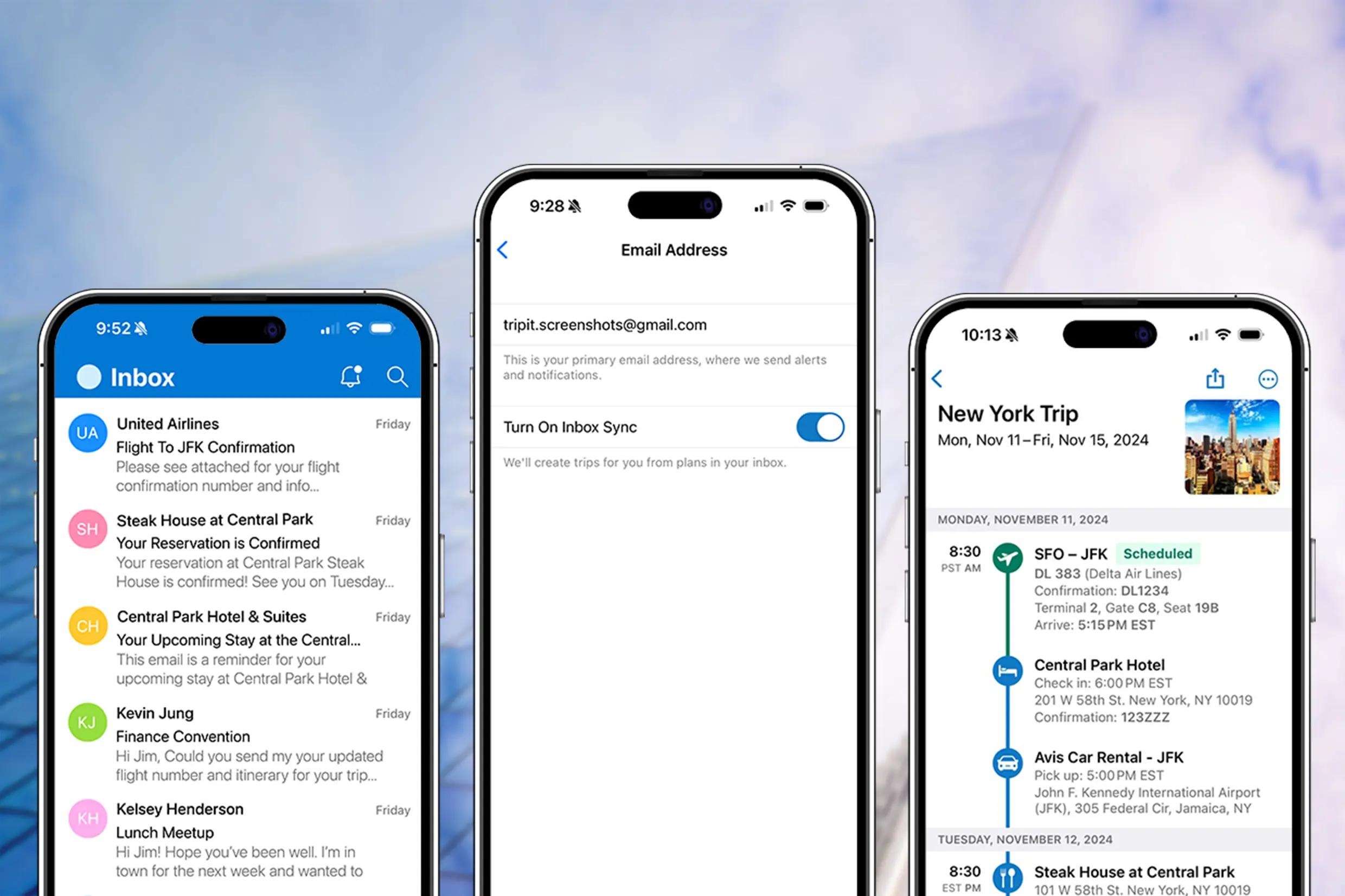
One of TripIt’s standout features is its ability to automatically generate travel itineraries. Users simply forward their confirmation emails for flights, hotels, rental cars, and other bookings to plans@tripit.com, and the app organizes all the details into a structured itinerary. For even more convenience, TripIt can sync with email providers like Gmail, Outlook, and Yahoo to detect and import bookings automatically.
This eliminates the need for manual data entry, saving time and reducing the chances of missing important trip details.
Centralized travel itinerary
TripIt acts as a one-stop hub for all travel-related plans, making it easy to keep track of flights, accommodations, car rentals, restaurant reservations, and activities.
The app consolidates everything into a single, easy-to-read itinerary that updates in real time. Even better, it organizes multiple trips separately, so frequent travelers can quickly switch between upcoming itineraries. This means no more digging through emails or scrambling to find booking details while on the go.
Works offline
A key advantage of TripIt is that users can access their itineraries even without an internet connection.
This is particularly useful for international travelers who may not always have reliable mobile data or Wi-Fi. Once an itinerary is created, all trip details are stored locally on the device, allowing travelers to check flight information, hotel addresses, and activity schedules anytime, anywhere.
Real-time flight alerts (Pro version)
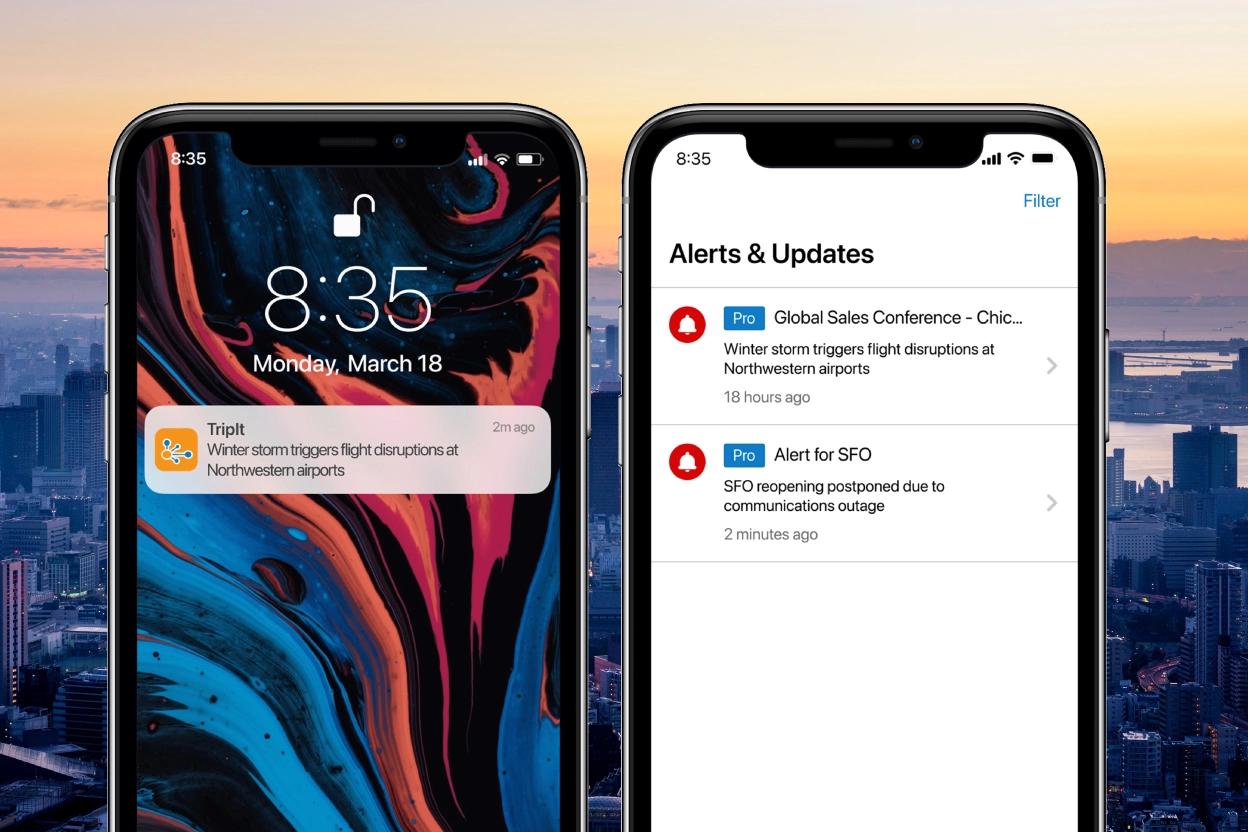
TripIt Pro offers real-time flight alerts, notifying users about delays, gate changes, and cancellations before airlines even send out notifications.
This feature can be a game-changer for frequent flyers, as it helps them adjust plans quickly and avoid unnecessary stress at the airport. Additionally, Pro users get baggage claim details upon landing, reducing the time spent searching for luggage carousels.
Alternative flight suggestions (Pro version)
If a flight is canceled or delayed, TripIt Pro provides alternative flight options, helping users find a new route to their destination.
This feature is especially useful for business travelers or those on tight schedules, as it eliminates the hassle of searching for backup flights manually. It also provides details on available seats, departure times, and airline contact information, making it easier to rebook quickly.
Airport and travel assistance (Pro version)
Navigating large airports can be overwhelming, but TripIt Pro offers interactive airport maps to help users find gates, lounges, restaurants, and other essential services.
Additionally, Pro users receive security line wait times, which can help them plan ahead and avoid unnecessary delays at TSA checkpoints. For those who frequently travel through unfamiliar airports, this feature can make layovers and transfers significantly smoother.
Travel document storage
TripIt provides a secure space to store important travel documents, such as passport copies, travel insurance details, and visa information.
Having everything accessible in one app eliminates the need to carry physical copies, reducing the risk of losing crucial documents while traveling. This feature is especially helpful for international travelers who need quick access to paperwork for border crossings or airline check-ins.
Calendar syncing
TripIt seamlessly integrates with calendar apps like Google Calendar, Outlook, and Apple Calendar.
Once linked, all upcoming trips automatically appear in the user’s schedule, ensuring they never forget flight times, hotel check-ins, or activity bookings. This feature is especially helpful for business travelers who juggle multiple meetings and trips, as it keeps everything aligned in one place.
Expense & carbon footprint tracking (Pro version)
TripIt Pro includes an expense tracking tool, allowing users to log travel-related costs such as airfare, hotel stays, and dining expenses.
This is particularly beneficial for business travelers who need to submit expense reports. Additionally, TripIt tracks carbon emissions from flights and provides recommendations for offsetting one’s environmental impact. This feature is great for eco-conscious travelers who want to reduce their carbon footprint while flying.
Team & group travel coordination
For those traveling with family, friends, or colleagues, TripIt makes it easy to share itineraries so everyone stays informed.
Users can grant others access to their trip details, ensuring that travel companions know the flight schedule, hotel information, and planned activities. This feature is particularly useful for corporate travel, where teams need to stay coordinated on business trips.
No ads (Pro version)
TripIt Pro removes all advertisements, providing a cleaner, distraction-free experience. While the free version includes some ads, upgrading to Pro ensures a seamless interface with no interruptions. This is a small but appreciated benefit for users who prefer an uncluttered experience.
5 Reasons You'll Love Using TripIt 😍
1. Automatic itinerary creation
Simply forward confirmation emails, and TripIt organizes everything into a neat, easy-to-access itinerary.
2. All travel details in one place
Flights, hotels, car rentals, and activities are stored in a single, centralized location.
3. Real-time flight alerts (Pro version)
Get notified about delays, cancellations, gate changes, and baggage claim updates.
4. Works offline
Access your itinerary even without an internet connection.
5. Calendar Syncing
Seamlessly integrates with Google, Outlook, and Apple calendars for easy scheduling.
5 Reasons You Might Not Love Using TripIt 😡
1. Limited features in the free version
Many of the best features (like real-time flight alerts and seat tracking) require the paid Pro version.
2. Email access required for automation
TripIt scans your inbox for travel confirmations, which some users might find intrusive.
3. No direct booking
Unlike some competitors, TripIt doesn’t allow you to book flights, hotels, or activities directly within the app.
4. Interface can feel cluttered
While functional, the app's layout might feel overwhelming or outdated compared to more modern travel apps.
5. Subscription cost for Pro features
The Pro version costs $49/year, which might not be worth it for infrequent travelers.
TripIt FAQs
Is TripIt free to use?
Yes, TripIt offers a free version that provides basic itinerary management, allowing users to forward confirmation emails and organize their travel plans. However, TripIt Pro ($49/year) includes additional features like real-time flight alerts, seat tracking, and alternative flight suggestions.
Is TripIt Pro worth it?
It depends on how often you travel. If you fly frequently, the real-time flight alerts, security line wait times, and seat upgrade tracking can be valuable. However, if you only travel occasionally, the free version may be enough for keeping your itineraries organized.
Does TripIt work offline?
Yes! Once your itinerary is saved in TripIt, you can access it offline, making it useful when traveling in areas with limited internet access.
Does TripIt automatically sync travel plans?
Yes, if you connect your email (Gmail, Outlook, etc.), TripIt can automatically scan for confirmation emails and add them to your itinerary. Alternatively, you can manually forward emails to plans@tripit.com to organize your trips.
How does TripIt compare to Google Travel?
Both apps organize travel plans, but TripIt provides a more structured itinerary and real-time alerts (with Pro). Google Travel is free and integrates well with Google services but lacks detailed flight tracking and advanced alerts. If you want proactive travel updates, TripIt Pro is a better choice, but if you prefer a free, basic solution, Google Travel might be sufficient.
What is Roadtrippers?
Roadtrippers is a comprehensive road trip planning tool that helps travelers discover scenic routes, unique attractions, and memorable stops. The platform provides custom maps, curated guides, and RV-friendly tools, making it ideal for both short getaways and long adventures. Premium features include offline maps, live traffic updates, and route customization.

Pros 😊
- Road Trip Focus: Specializes in road trip planning, highlighting scenic routes, attractions, and restaurants.
- Detailed Maps and Points of Interest: Offers unique suggestions for lesser-known destinations.
- Collaborative Planning: Allows group editing of itineraries.
"I do a lot of road trips, and this app is great for planning. It will arrange stops in a logical way, but it will also allow me to move them if desired. I love the feature that lets you see the stops on a map, so I can see if a stop is too far of my desired trip route. The app can also give great suggestions for whatever your favorite thing to see on your travels is. I wish it included more hiking trailheads, but I can typically get somewhat close to where I want to go."
Cons 😭
- Subscription Required for Full Access: The free version limits the number of stops you can add to a trip.
- US-Centric: While it works internationally, its features and recommendations are tailored for the US.
- Occasional Glitches: Some users report occasional bugs when saving or editing trips.
"I used to love Roadtrippers. Planned some of my best trips with it's help. Went to download it again for another trip coming up and it's completely changed. The awesome feature of being able to explore the area around you is now useless. They try to plan it for you and it isn't at all what you would want. AI can be a great companion, unfortunately for Roadtrippers, it ruined a really great thing. So disappointed."
Roadtrippers is a specialized road trip planning platform that excels at discovering interesting stops and attractions along driving routes throughout the United States and Canada. Rather than simply getting you from point A to point B, it focuses on making the journey itself an adventure by suggesting hidden gems, quirky roadside attractions, and worthwhile detours you might otherwise miss.
The platform's greatest strengths lie in its comprehensive database of points of interest, strong RV and camping features (enhanced by the Campendium acquisition), and collaborative planning tools that make group trips more manageable. The new AI-powered Autopilot feature represents a significant leap forward in automated trip planning, using insights from millions of previous trips to create personalized itineraries. For RV travelers and camping enthusiasts, the specialized routing and extensive campground integration make it particularly valuable.
However, Roadtrippers has significant drawbacks that limit its appeal. The free version is so restricted (only 7 stops) that it's essentially a demo, forcing most users into paid subscriptions. The annual-only billing with automatic renewal has frustrated many users who forget to cancel. Additionally, while the platform excels at discovery and planning, its navigation features lag behind dedicated GPS apps, meaning many users still need separate navigation solutions.
Still, for travelers who love discovering unique stops and hidden gems along their route—especially RV travelers and camping enthusiasts in North America—Roadtrippers offers an unmatched combination of discovery tools, community insights, and specialized features that can transform ordinary drives into memorable adventures. The investment in a paid subscription often pays for itself through discovering experiences you would have otherwise missed.
Top Features Of Roadtrippers
AI-powered trip planning (Autopilot)
Roadtrippers' newest feature, Autopilot, uses artificial intelligence and data from over 38 million planned trips to create personalized itineraries. By answering a few questions about your preferences, budget, vehicle type, and interests, the AI generates custom route suggestions with stops tailored to your travel style. This patent-pending technology factors in accommodations, dining preferences, activities, and budget levels to create unique adventures.
Autopilot is exclusively available to Premium members and represents a significant advancement in automated trip planning.
Comprehensive route discovery and suggestions
The platform excels at uncovering hidden gems, quirky roadside attractions, and off-the-beaten-path destinations that you won't find on traditional navigation apps. Roadtrippers maintains a database of millions of points of interest across the US, Canada, Australia, and New Zealand, with detailed information including photos, reviews, hours of operation, and user ratings.
The app categorizes attractions by type (outdoor recreation, dining, lodging, entertainment, historic sites) and allows you to filter by distance from your route to discover nearby gems.
RV-specific navigation and planning
After acquiring Campendium, Roadtrippers has become a powerhouse for RV travelers. The platform offers RV-friendly GPS navigation that accounts for your vehicle's height, weight, length, and propane restrictions to suggest safe routes avoiding low bridges, narrow roads, and restricted areas.
Enhanced camping features include access to over 150,000 campground reviews, comprehensive map overlays showing public lands, cell coverage, and wildfire smoke, plus advanced filtering by elevation and cellular service quality.
Collaborative trip planning
Multiple users can simultaneously edit and contribute to the same trip itinerary, making it perfect for group road trips where everyone wants input on destinations and stops. Collaborators can add suggestions, vote on activities, and help build the perfect group adventure.
The sharing features extend beyond planning, allowing you to share completed trips as inspiration for other travelers or keep family updated on your progress.
Multi-tier trip complexity support
Roadtrippers accommodates everything from short day trips to epic cross-country adventures. The free version allows up to 7 stops, Basic membership supports up to 20 stops, Pro handles up to 50 stops, and Premium enables massive 150-stop road trips perfect for extended journeys or comprehensive regional exploration.
Each stop can include detailed notes, photos, and timing information to create comprehensive travel guides.
Offline maps and navigation
Premium and Pro members can download offline maps for specific regions, ensuring access to your route and destination information even in areas with poor cellular coverage. This feature is essential for remote road trips and camping adventures where internet connectivity is unreliable.
The app also provides in-app navigation with turn-by-turn directions, though many users prefer to export routes to Google Maps for primary navigation.
Budget estimation and cost tracking
Roadtrippers automatically calculates estimated fuel costs based on your vehicle type, route, and current gas prices. The budgeting tools help you understand the financial impact of route changes and plan accordingly for long trips.
The system shows cost breakdowns by segment and provides transparency into total trip expenses before you hit the road.
Pre-made travel guides and routes
The platform features handcrafted travel guides created by travel experts and community members, covering popular routes like national park loops, historic trails, and scenic byways. These guides provide inspiration and starting points that you can customize to match your interests and timeline.
Users can also create and share their own guides, contributing to the community knowledge base.
Advanced map overlays and filtering
Premium members access multiple map overlays including live traffic conditions, cellular coverage maps, public land boundaries (BLM, National Forest, National Parks), and wildfire smoke tracking. These overlays help you make informed decisions about routes and stops.
The filtering system allows you to search for specific types of destinations, facilities, or amenities along your route.
Export and sharing functionality
Roadtrippers allows you to export your complete trip as a PDF guide for offline reference or create GPX files for use with other GPS devices. You can also generate shareable links to let family and friends follow your planned route.
The export features make it easy to have backup navigation options and physical references during your travels.
Real-time traffic and route optimization
The platform provides live traffic updates and can suggest alternate routes or detours when road conditions change. While driving, you can check traffic conditions before making stops to avoid delays.
The system automatically recalculates optimal routes when you add, remove, or reorder stops, ensuring efficient travel paths.
5 Reasons You'll Love Using Roadtrippers 😍
1. Uncover hidden gems automatically
Discover amazing roadside attractions, local diners, and unique stops you'd never find on regular navigation apps—all automatically suggested along your route.
2. Perfect for RV and camping adventures
With RV-specific routing, 150,000+ campground reviews, and specialized overlays for public lands and cell coverage, it's built for outdoor enthusiasts.
3. AI-powered trip planning
Answer a few questions and let Autopilot create a complete itinerary based on insights from 38 million previous trips—like having a personal travel expert.
4. Collaborative group planning
Plan epic road trips with friends and family where everyone can contribute ideas, vote on stops, and build the perfect group adventure together.
5. Comprehensive offline capabilities
Download maps and access your entire itinerary without internet, essential for remote adventures and areas with poor cellular coverage.
5 Reasons You Might Not Love Using Roadtrippers 😡
1. Severely limited free version
The free version only allows 7 stops per trip, making it practically useless for anything beyond the shortest day trips—you'll likely need to upgrade immediately.
2. Annual-only billing with auto-renewal
No monthly options available, and many users complain about unexpected auto-renewals. You must remember to cancel manually or face another year charge.
3. Geographic limitations
Primarily focused on the US and Canada with limited coverage for Australia and New Zealand. International travelers outside these regions will find little value.
4. Navigation isn't replacement-quality
While it offers in-app navigation, most users still prefer Google Maps or Waze for actual turn-by-turn directions—making it more of a planning tool than navigation solution.
5. Data accuracy issues
Some users report outdated information about restaurants, attractions, or businesses that have closed or relocated, potentially leading to disappointing detours.
Roadtrippers FAQs
How much does Roadtrippers cost?
Roadtrippers offers a very limited free version with 7 stops. Paid options include Basic ($35.99/year) for 20 stops, Pro ($49.99/year) for 50 stops, and Premium ($59.99/year) for 150 stops plus all features like AI Autopilot and offline maps. Only annual billing is available with automatic renewal.
Can I use Roadtrippers for navigation while driving?
Yes, Roadtrippers includes in-app navigation with turn-by-turn directions, but most users report it's not as reliable as dedicated GPS apps like Google Maps or Waze. The platform is primarily designed for trip planning and discovery rather than primary navigation, and many users export their routes to Google Maps for actual driving directions.
Does Roadtrippers work outside the United States?
Roadtrippers primarily covers the United States and Canada with comprehensive data and features. It has limited coverage in Australia and New Zealand, but the vast majority of attractions, reviews, and features are focused on North America. International travelers elsewhere will find minimal value.
What's the difference between Roadtrippers and regular GPS apps?
Regular GPS apps like Google Maps focus on getting you from point A to B efficiently. Roadtrippers is designed to make the journey interesting by suggesting attractions, restaurants, scenic routes, and hidden gems along your path. It's more of a discovery and planning tool that helps you find worthwhile stops you'd never know existed.
Is the free version of Roadtrippers worth trying?
The free version is extremely limited with only 7 stops allowed per trip, making it more of a preview than a functional tool. Most users find they need to upgrade almost immediately for any real road trip planning. However, it's worth trying to see if you like the interface and discovery features before committing to a paid subscription.
Summary: Which Is Best For You?
The choice between TripIt and RoadTrippers ultimately comes down to your travel type and planning needs. RoadTrippers offers the more specialized experience with AI-powered route planning, curated roadside attractions, and comprehensive RV routing that make it particularly appealing for road trip enthusiasts. Its discovery-focused approach consolidates route optimization, hidden gem suggestions, and gas cost estimation in ways that TripIt doesn't match.
However, RoadTrippers' specialized features come at significant costs in versatility and geographic coverage. The restriction to only four countries (US, Canada, Australia, New Zealand), focus solely on road trips, and occasional stability issues make it feel more like a niche tool than a comprehensive travel solution. For international travelers or those taking non-driving trips, RoadTrippers' limitations pose real constraints.
TripIt prioritizes universal travel organization and proven reliability over specialized discovery features. Its industry-leading email parsing works for any type of travel anywhere in the world, offers superior flight tracking with real-time alerts, and provides the structured itinerary management that all travelers need. While it lacks RoadTrippers' curated discovery tools and road trip-specific features, it delivers dependable trip organization across all travel types without geographic restrictions.
The verdict: Choose RoadTrippers if you're a dedicated road tripper in supported regions who values automated discovery and can justify the subscription for specialized features like RV routing and hidden gem suggestions. Choose TripIt if you take various types of trips globally, prioritize flight tracking and reliable organization, or need a proven tool that works for business travel, international trips, and any booking method.
Frequently Asked Questions
What's the fundamental difference between these apps?
TripIt is a travel organization tool that consolidates existing booking confirmations into structured itineraries. It works after you've made reservations and focuses on organizing what you've already booked.
RoadTrippers is a road trip planning tool that helps you discover routes, attractions, and stops before you book anything. It focuses on planning and discovery, specifically for driving trips.
Which app works better for different types of travel?
TripIt works for all travel types - flights, trains, hotels, cruises, international trips, business travel, and leisure travel anywhere in the world.
RoadTrippers only works for road trips and only in four countries (US, Canada, Australia, New Zealand). If you're flying, taking trains, or traveling outside these regions, RoadTrippers won't help you.
How do these apps handle trip planning vs. organization?
TripIt doesn't help with planning - you book your travel elsewhere, then forward confirmation emails to create organized itineraries. It's purely for organization after booking.
RoadTrippers is all about planning - it suggests routes, attractions, gas stops, and accommodations before you book anything. It uses AI to help plan your entire road trip from scratch.
Which offers better value for the price?
TripIt costs $49/year for Pro features but works globally for any travel type, making it valuable for frequent travelers who take various types of trips.
RoadTrippers costs $29.99/year and offers more features for less money, but only works for road trips in four countries, limiting its overall value unless you're a dedicated road tripper.
Which app is more reliable for important trips?
TripIt has proven reliability since 2006 with excellent email parsing, consistent flight tracking, and stable performance that business travelers depend on for critical trips.
RoadTrippers has some reported stability issues including occasional crashes and bugs. While feature-rich, it may be less dependable for important travel where you need guaranteed access to your plans.